
Add a README badge

A badge is a small image in your README that reports one signal from your latest analysis, such as the number of vulnerabilities, the health score, or how many direct dependencies are up to date. You paste one line, once. The image is built each time a reader loads it, so it always shows your most recent analysis.
Badges work on public repositories only. Everything below assumes one.
Copy the snippet from the Badges tab
Open the project, then the Badges tab. The Quality Badges card holds the five badges, a preview of the one you picked, and the snippet to paste, in Markdown and in HTML. Each badge card shows the value its badge prints today, so you can compare them before you pick one.
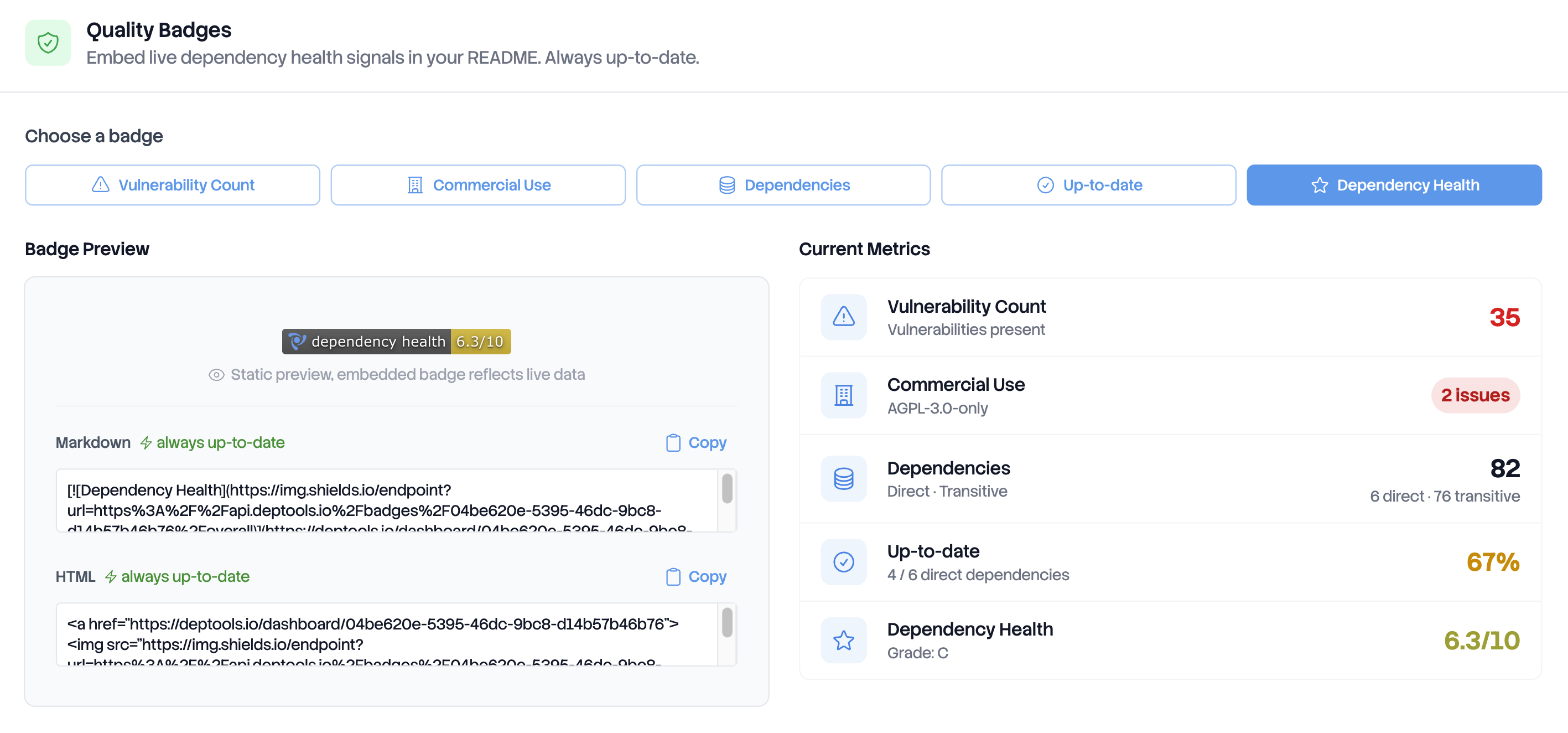
Pick a badge, copy the Markdown, paste it at the top of your README. That is the whole task.
The snippet is an image inside a link:
[](https://deptools.io/dashboard/<project-uuid>)
It holds two addresses, one inside the other:
https://api.deptools.io/badges/<project-uuid>/<badge-id>is the Deptools endpoint. It answers with the current values, in the JSON format shields.io expects. Opening it in a browser is the fastest way to check a badge before you commit it.https://img.shields.io/endpoint?url=...is the image. shields.io calls the endpoint above, URL encoded in theurlparameter, and draws the badge.
The Badges tab is open to anyone who can see the project: members of the organization, viewers invited on the project, and anyone at all on a public repository. A contributor who is not part of your organization can copy the snippet as well as you can.
The five badges
The five below are live. They read the public Deptools demo project, so their values change every time it is scanned. Each one links to that project's dashboard.
| Badge | The badge reads | Color |
|---|---|---|
 | dependency vulnerabilities, then the number found by the analysis across the whole graph, direct and transitive, counted once per affected package | Green at 0, yellow below 5, red at 5 and above |
 | commercial use, then safe, or the number of strong copyleft licenses found | Green when none was found, red otherwise |
 | dependencies, then the direct count and the transitive count | Always blue. It reports a size, not a risk |
 | direct deps up-to-date, then the share of direct dependencies on their latest version | Green from 75%, yellow from 50%, orange from 25%, red below 25% |
| dependency health, then the overall score out of 10 | Green from 8, yellow from 6, red below 6 |
Every badge carries the Deptools logo on the left, in the flat shields.io style. The label, the color and the style all come from the endpoint, so the same badge looks the same everywhere it is embedded.
All five read the most recent completed analysis of the project. Opening an older analysis from the History tab does not change the badge. A project that has never been scanned, or whose scans have all failed, has no completed analysis to read, and all five badges stay grey until one lands.
Two of them can read unavailable on a project that is otherwise fine.
Dependency Health and Up-to-date both need a value the analysis may not
have produced: a project where nothing measurable was found has no overall score
and no up to date share, and the badge says so rather than printing a zero.
A badge id the endpoint does not know produces that same grey badge, not an error. So a typo in a manually written URL looks exactly like a project with nothing to report.
Public repositories only
A badge is served to anyone who loads it, with no account and no key. So the
endpoint serves badges for public repositories and refuses everything else, with the
grey unavailable badge. Two cases:
- A private repository. The card on the Badges tab shows no picker and nothing to copy.
- A CI upload project. Is always private, so it never gets a badge.
The badge and the dashboard follow the same rule, so a badge someone can load is a dashboard they can open. Connect a GitHub repository covers what repository visibility decides.
Where the badge links, and when it updates
The image is wrapped in a link to the Deptools dashboard of that project,
https://deptools.io/dashboard/<project-uuid>, not to GitHub. The repository is
public, so anyone who clicks the badge opens that dashboard with no account: the
six dimension scores, the packages that pull the score down, and the graph.
The snippet never changes. Once it is committed, a new scan is enough to move the numbers, and nothing has to be copied again.
Two caches sit between an analysis and what a reader sees. Deptools answers with a one hour cache header, and the site rendering your README caches the image on its own side. So a badge can lag a scan by an hour or more. Open the endpoint directly to see the current values.
Next steps
- Export reports and SBOMs when you need a file to send rather than a signal to display.
- Scan from GitHub Actions so the badge follows every push.
- The health score for what Dependency Health measures.