
Scan from GitHub Actions
The Deptools action starts a scan from a GitHub Actions workflow. In its shortest form it scans on every push and never blocks anything. Add four more lines and it waits for the analysis and fails the build when the result crosses a threshold you set.
It is published on the GitHub Marketplace as deptools-io/scan-action@v1.
curl,
quality gates included. If your project has no GitHub repository behind it, your
pipeline sends the build files instead, see
Analyze a project without GitHub.
This action cannot feed such a project, since it sends no files. Triggering a
scan is allowed on every plan. Pushing build files requires Pro.The action uploads nothing from the runner. It calls the Deptools API, and Deptools reads the build file on GitHub through the GitHub App, on the branch configured on the project. Two consequences:
- The workflow needs no
actions/checkout, and the job lasts a few seconds when it does not wait for the result. - The branch or ref that triggers the workflow does not affect the scan. On a pull request, the action still scans the branch configured on the project. Run it on a push to that branch, or on a schedule.
Add the action to a workflow
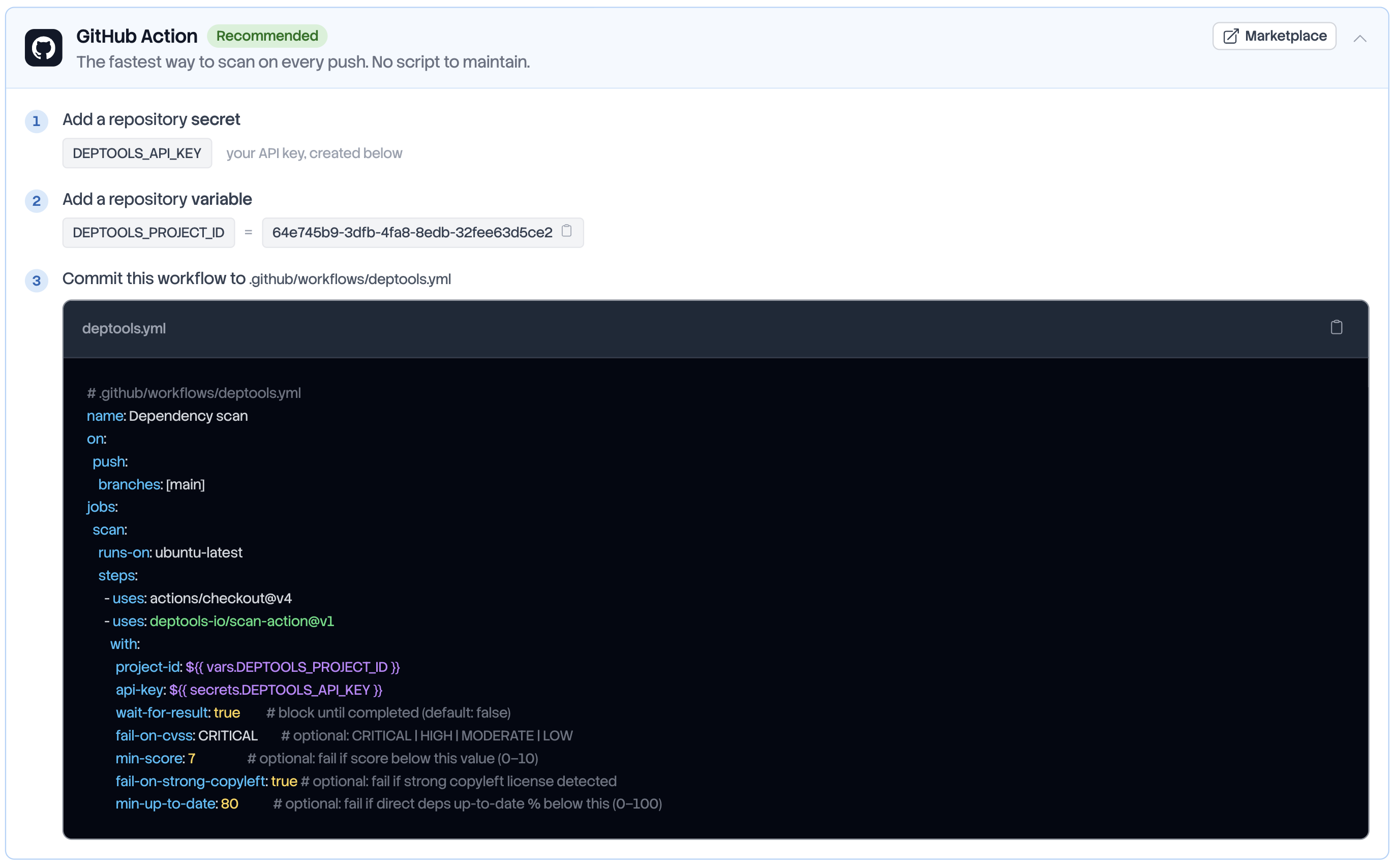
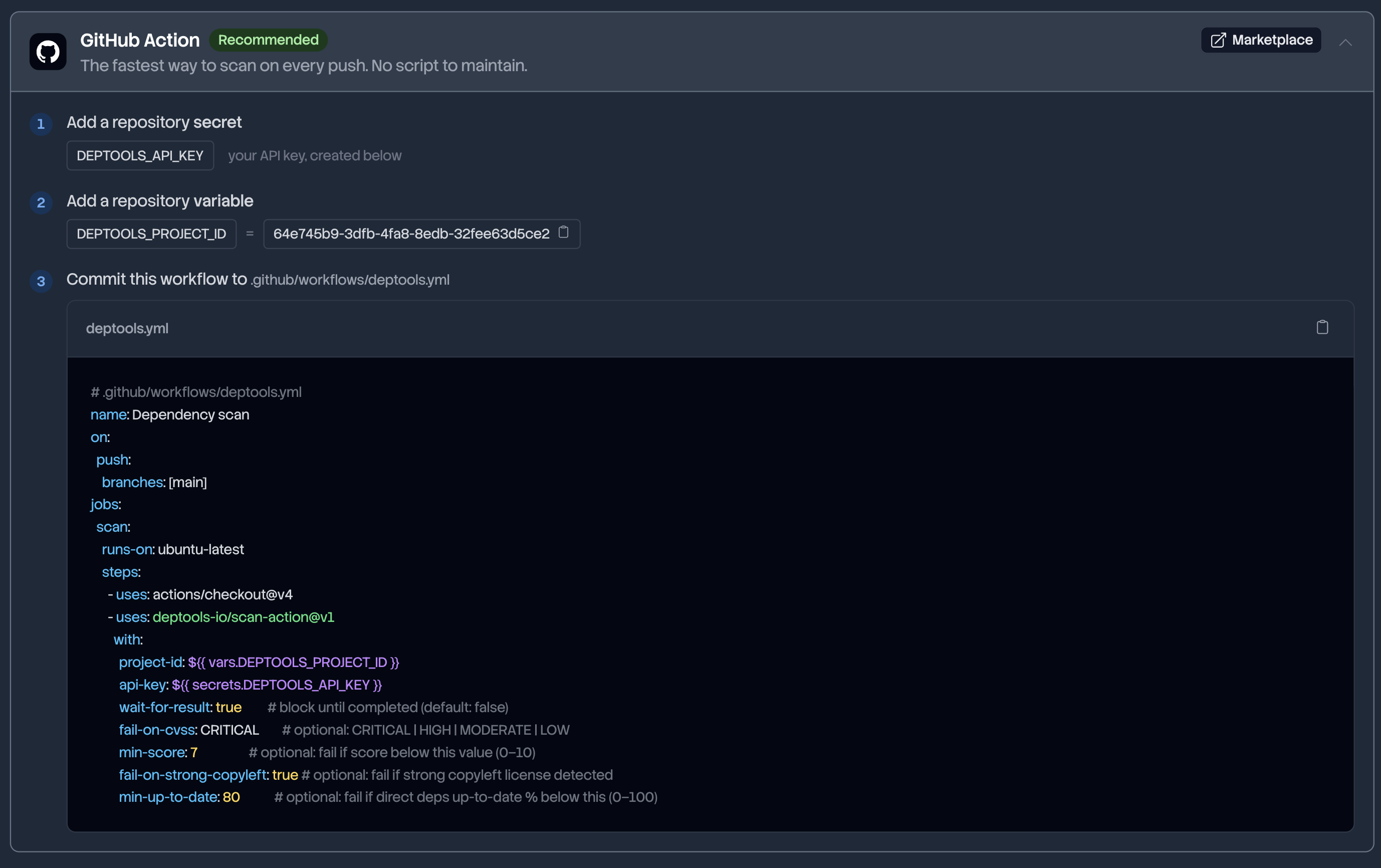
Commit this to .github/workflows/deptools.yml:
name: Deptools scan
on:
  push:
    branches: [main]
jobs:
  scan:
    runs-on: ubuntu-latest
    steps:
      - uses: deptools-io/scan-action@v1
        with:
          project-id: ${{ vars.DEPTOOLS_PROJECT_ID }}
          api-key: ${{ secrets.DEPTOOLS_API_KEY }}
Replace main with the branch the project analyzes. The two values come from
the Integrations tab of the project, and the next section declares them.
This setup is fire-and-forget. The job ends as soon as Deptools accepts the scan, and the analysis appears in the dashboard a few minutes later. Nothing here can fail your build.
To use the result as a gate, make the job wait:
      - uses: deptools-io/scan-action@v1
        with:
          project-id: ${{ vars.DEPTOOLS_PROJECT_ID }}
          api-key: ${{ secrets.DEPTOOLS_API_KEY }}
          wait-for-result: true
          timeout: 1800
wait-for-result polls the analysis every 20 seconds until it completes or
fails. timeout sets how long the job waits, in seconds. The default is 300.
Store the project id and the API key
Open the project, then the Integrations tab. Its GitHub Action card shows both values, each with a copy button.
| Declare it as | Name | Value |
|---|---|---|
| Repository variable | DEPTOOLS_PROJECT_ID | The project UUID, shown at step 2 of the card |
| Repository secret | DEPTOOLS_API_KEY | An API key, created at the bottom of the same tab |
Both live on GitHub, under Settings, Secrets and variables, Actions. The project id only names a project, so a variable is enough. The key authenticates, so it belongs in a secret and never in the YAML. The action masks it in the logs.
Use a project key (dt_proj_...) for a single repository. Use an
organization key (dt_org_...) when multiple repositories run the same
workflow, and store it once as an organization secret on GitHub.
Manage API keys covers what each scope reaches, who
can create a key and how to rotate one.
Fail the build on quality gates
Gates are evaluated only when wait-for-result is true. Without it, the four
inputs below are ignored and the job always passes.
| Input | Fails the job when | Accepted values |
|---|---|---|
fail-on-cvss | the analysis found at least one vulnerability at or above this severity | CRITICAL, HIGH, MODERATE, LOW |
min-score | the health score is below the value | 0 to 10 |
fail-on-strong-copyleft | at least one package carries a strong copyleft license, GPL for example | true, false |
min-up-to-date | fewer than this percentage of direct dependencies sit on their latest version | 0 to 100 |
A complete workflow with all four:
name: Deptools scan
on:
  push:
    branches: [main]
jobs:
  scan:
    runs-on: ubuntu-latest
    steps:
      - uses: deptools-io/scan-action@v1
        with:
          project-id: ${{ vars.DEPTOOLS_PROJECT_ID }}
          api-key: ${{ secrets.DEPTOOLS_API_KEY }}
          wait-for-result: true
          timeout: 1800
          fail-on-cvss: HIGH
          min-score: 7
          fail-on-strong-copyleft: true
          min-up-to-date: 80
They are evaluated in the order of the table, and the first one that fails stops the job. A failed build therefore names one gate at a time: fix it, and the next run may stop on the one below.
Two of them skip instead of failing, and both print a warning in the log:
- An unknown
fail-on-cvssvalue disables that gate and the job passes. Case does not matter,highworks, but a typo protects nothing. Read the log of the first run. min-up-to-dateon a project with no direct dependency has nothing to measure, so it is skipped.
fail-on-cvss: CRITICAL for
example, then tighten. A workflow that fails on its first run gets disabled by
the team instead of being investigated.Read the action output
Give the step an id, and later steps can read its outputs.
| Output | Value | Set when |
|---|---|---|
status | running, completed, failed or skipped | the API answered |
job-id | the analysis UUID | the scan was accepted |
poll-url | the status URL of that analysis | the scan was accepted |
overall-score | the health score, 0 to 10 | wait-for-result: true and the analysis completed |
commercial-use | true when at least one strong copyleft license was found | same |
direct-up-to-date | percentage of direct dependencies on their latest version | same, and the project has direct dependencies |
commercial-use reads backwards. true does not mean commercial use is
allowed. It means the analysis found a strong copyleft license, which is the
case you want to look at. Write your condition accordingly.
The health score explains what strong copyleft
implies. - uses: deptools-io/scan-action@v1
id: deptools
with:
project-id: ${{ vars.DEPTOOLS_PROJECT_ID }}
api-key: ${{ secrets.DEPTOOLS_API_KEY }}
wait-for-result: true
timeout: 1800
fail-on-cvss: HIGH
- name: Publish the score
if: always()
run: |
echo "Status: ${{ steps.deptools.outputs.status }}" >> "$GITHUB_STEP_SUMMARY"
echo "Score: ${{ steps.deptools.outputs.overall-score }}/10" >> "$GITHUB_STEP_SUMMARY"
if: always() matters here. A failed gate fails the step, and without it every
step behind is skipped, including the one that reports why.
If the scan cannot be started, the job fails with Failed to trigger scan (HTTP …) and no output is set:
| HTTP | Cause and fix |
|---|---|
| 401 | The key is missing, malformed or expired. Create a new one and update the secret |
| 404 | Unknown project id, or a project outside the key's scope. A project key reaches its own project only, and the the API deliberately returns the same response in both cases |
| 400 | The project is a CI upload project, which expects your build files rather than a bare trigger. See Analyze a project without GitHub |
A scan can also be accepted and then fail. With wait-for-result: true the job
fails with Deptools scan failed followed by the reason, for example when the
GitHub App no longer has access to the repository.
What happens during a cooldown
On the Free plan, Deptools accepts one scan every three hours per project configuration. Pro and Open Source Max have no cooldown, so a workflow can run on every push.
Every scan counts against it, whoever or whatever started it. Organizations and plans defines what a configuration is.
During the cooldown the API refuses the scan and the action does not fail
the job. It prints Scan cooldown active — retry after <date>. Skipping scan.,
sets status to skipped and exits. The build stays green, no gate is
evaluated, and the dashboard keeps the previous analysis.
The action treats the hourly limit of the scan endpoint the same way. Runners hosted by GitHub rarely reach it.
Next steps
- Manage API keys to set an expiration and rotate a key without breaking a workflow.
- Track scores over time to read what those scans accumulate.
- Scan from another CI when a second pipeline, outside GitHub Actions, has to scan too.