
Create many projects at once
Creating projects manually in the interface is fine for a handful.
For a large portfolio, that can mean an hour of clicking.
One request creates them all and returns the
name to uuid table you paste into your CI variables.
This endpoint replaces the creation step, nothing else. The plan, the key and the scan job in each pipeline stay the same. If you have never set up a CI upload project, do one by hand first with Analyze a project without GitHub: it shows you what the batch produces.
What it creates, and what it does not
It creates CI upload projects only, the ones with no GitHub repository attached. Projects linked to GitHub can only be created in the interface, since creating one verifies your access to the repository and this endpoint cannot do that.
It does not remove the per project configuration. Each pipeline still needs its own project UUID.
What you need
- The Pro plan. A CI upload project is always private.
- One available private slot for every project the batch creates. Open your organization settings, Plan tab, Private slots, and compare the Available count with the number of projects you are about to create. Organizations and plans explains what occupies a slot and what buying one bills you.
- An organization API key (
dt_org_...) allowed to create projects.
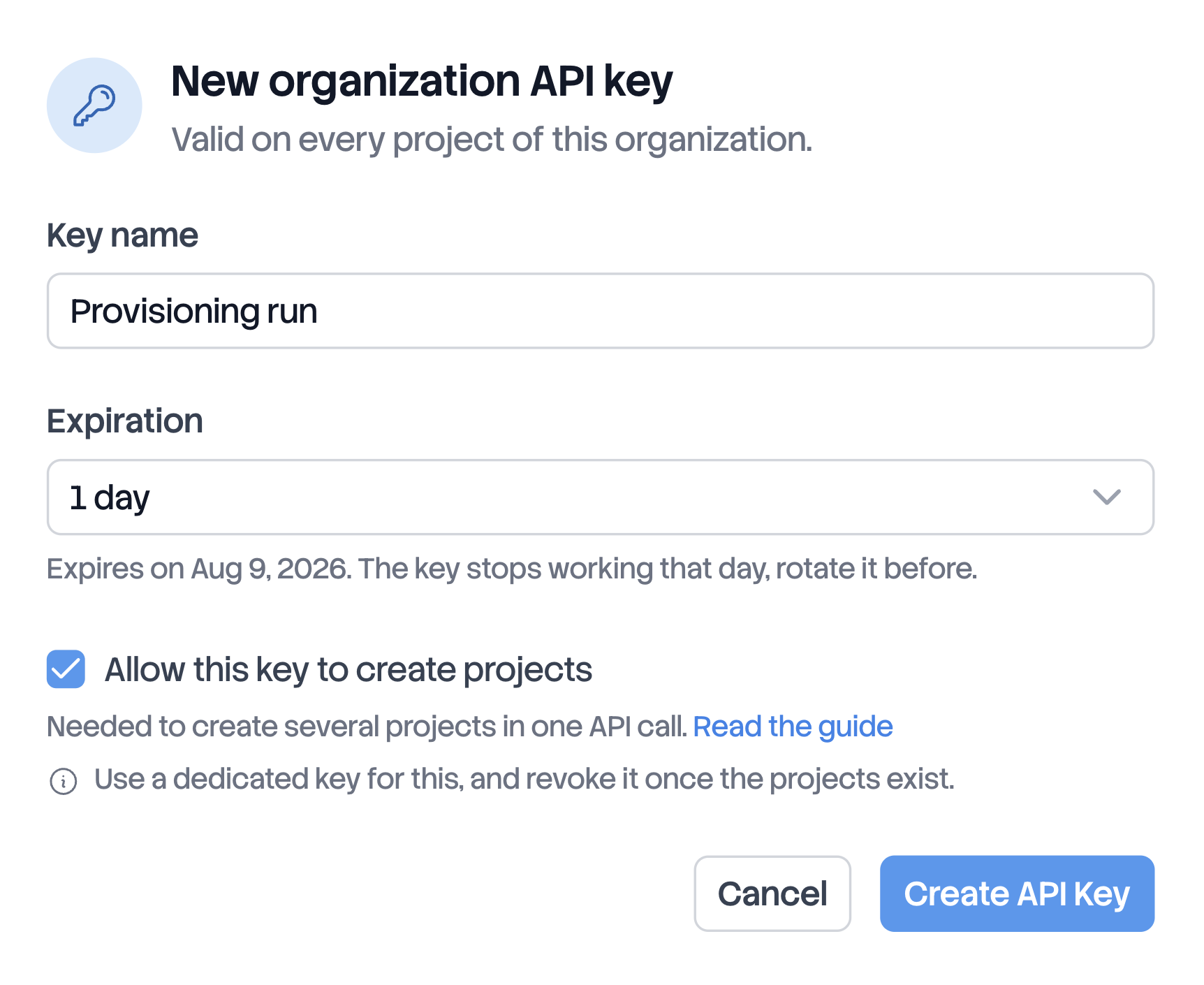
A key that can create projects
The permission is never implicit. A scan key cannot create projects and gets a
403. You grant this permission when you create the key, and an existing key
can never gain it later.
In your organization settings, go to API keys, click New key, and check Allow this key to create projects. Keys with this permission show a Can create projects label in the list.
You must be an owner or admin of the organization to create a key. The key is shown only once. See Manage API keys.
Send the batch
POST https://api.deptools.io/v1/projects/bulk
Authorization: Bearer dt_org_...
Content-Type: application/json
{
  "projects": [
    { "name": "backend", "build_system": "NPM", "branch": "main", "excluded_scopes": ["dev"] },
    { "name": "legacy", "build_system": "MAVEN", "subfolder": "modules/worker"},
    { "name": "payments", "build_system": "GRADLE", "excluded_scopes": ["test"] },
    { "name": "billing", "build_system": "SBT", "excluded_scopes": ["test"] },
    { "name": "storefront", "build_system": "COMPOSER", "excluded_scopes": ["require-dev"] }
  ]
}
Each entry carries exactly the fields of the upload form in the interface:
| Field | Required | Description |
|---|---|---|
name | yes | 1 to 255 characters. Leading and trailing spaces are removed |
build_system | yes | MAVEN, GRADLE, SBT, NPM or COMPOSER. Fixed at creation |
branch | no | A label displayed in the interface, not a branch Deptools reads. Defaults to default, editable later |
subfolder | no | The module to analyze, for example services/api. Empty or absent analyzes the repository root. Editable later |
excluded_scopes | no | The scope keys to keep out of the analysis, taken from the table below. Absent excludes nothing. Fixed at creation |
Send 1 to 100 entries per request, and split anything larger into several batches.
Projects are always created in the organization the key belongs to. This endpoint cannot target another one.
Scope keys per build system
Every scope has a key, and excluded_scopes takes the key, never the label the
interface shows. The vocabulary is not the same across build systems: the
development block is dev on npm and require-dev on Composer.
build_system | Scope keys, with the label shown in the interface | Same as the interface default |
|---|---|---|
MAVEN | test (Test), provided (Provided), optional (Optional), runtime (Runtime), compile (Compile) | ["test"] |
GRADLE | test (Test), annotationProcessor (Annotation Processor), compileOnly (Compile Only), runtimeOnly (Runtime Only), optional (Optional), compile (Compile) | ["test"] |
SBT | test (Test), provided (Provided), optional (Optional), runtime (Runtime), compile (Compile) | ["test"] |
NPM | dev (Development), optional (Optional), peer (Peer), prod (Production) | ["dev"] |
COMPOSER | require-dev (Require Dev), require (Require) | ["require-dev"] |
Exclude dependency scopes explains what each key covers and which ones are worth excluding.
Three rules apply to every key:
- Keys are case sensitive.
Testis refused with a422, and the whole batch with it. Watch the camelCase keys of Gradle and the hyphen ofrequire-dev, sincebuild_systemright next to them is uppercase. testworks on every build system. It always means the test block, so it stands fordevon npm and forrequire-devon Composer. Write it if you generate your file from a script and would rather not carry this table.- A key from another build system is accepted and filters nothing.
annotationProcessoron anNPMentry returns a200and has no effect. Nothing warns you, so read the table before you send 100 entries.
excluded_scopes excludes nothing. The interface form excludes your
test scope for you, this endpoint does not. A batch sent without the field
analyzes the test and development dependencies of every project it creates.
Nothing fixes that afterwards, since the selection is fixed at creation. Delete
the projects and create them again.Read the response
{
  "projects": [
    { "name": "backend", "uuid": "3f2b...", "created": true },
    { "name": "legacy", "uuid": "c04e...", "created": false },
    { "name": "payments", "uuid": "1b95...", "created": true },
    { "name": "billing", "uuid": "9a71...", "created": true },
    { "name": "storefront", "uuid": "7d38...", "created": true }
  ],
  "slots": {
    "occupied": 30,
    "included": 5,
    "extra": 25,
    "capacity": 30,
    "available": 0,
    "overAllocated": false
  }
}
The response lists every entry you sent, in the same order, whether the project was just created or already existed. You can therefore join it to your own file line by line. Names come back as you wrote them, minus the leading and trailing spaces.
slots reports your private slots once the batch is applied, so it tells you
what the batch cost:
| Field | Meaning |
|---|---|
occupied | Private projects that exist right now |
included | Slots bundled with the plan, 5 on Pro |
extra | Slots bought on top of the plan |
capacity | included plus extra |
available | Slots you can still use, never negative |
overAllocated | true when more private projects exist than the capacity allows |
The response also includes slots when the batch is refused. There it reports
the state the batch started from, since no projects were created.
Replaying the same batch is safe
The endpoint finds or creates. An entry whose name already exists in the organization
returns the existing project's UUID with created: false, inserts nothing and
uses no slot.
This makes retries safe. If your request times out, if your install script stops halfway, if you no longer know where you stopped, retry the same file. You get the complete table, the same UUIDs, and nothing is duplicated or billed twice. A replay is never refused for missing slots, even in an organization that has none free.
So created: false is not an error. On a replay it is the normal case.
Names match ignoring case and spaces
Backend-API and backend-api are the same project to this endpoint, and so are a
name with surrounding spaces and the same name without them. Without that,
replaying your file with one capital letter changed would create a second, nearly
identical project you never asked for.
Two consequences:
- two entries of the same file that differ only by case are refused as a duplicate;
- the response gives you the name as you sent it, even when the stored project spells it differently, so you can always join it back to your file.
The rest of Deptools stays case sensitive. An organization can hold Name and
name as two distinct projects, created in the interface. In that case, an entry
asking for name returns the project whose name matches exactly, and the oldest
of the two if neither matches.
The batch is all or nothing
Capacity is checked before the first write. If there are not enough slots for the entire batch, no project is created and the response tells you how many to buy:
{
  "errors": [
    {
      "message": "30 projects to create, 12 free private slots: buy 18 more to run this batch. Nothing was created.",
      "code": "NO_FREE_SLOT",
      "needed": 30,
      "available": 12,
      "missing": 18
    }
  ],
  "slots": {
    "occupied": 18,
    "included": 5,
    "extra": 25,
    "capacity": 30,
    "available": 12,
    "overAllocated": false
  }
}
Only the projects that do not exist yet count toward needed, so a batch of 30
entries where 20 already exist needs 10 slots. Buy the missing slots and retry
the same file.
Two things to check before you run it
A name already taken by a GitHub project returns that project's UUID.
Project names are unique inside an organization, all types together, and this
endpoint does not tell them apart. If your organization already holds a GitHub
project named backend-api and your file asks for backend-api, you get its
UUID with created: false. Your pipeline is then refused with This project is linked to a Git repository: the scan endpoint takes no request body. This is the
one case where the table you get back is not directly usable. Check the names
first, or prefix the ones in your batch.
An existing project is returned as it is, never updated. If you fix the
build_system, the subfolder or the excluded_scopes of an entry and replay,
nothing changes on the existing project. The subfolder and the branch are
editable in the project settings. The build system and the scope keys are not: to
change them, delete the project and create it again. The freed slot stays paid
and reusable, so that costs nothing.
After the batch
The projects appear in the interface immediately, with no analysis. That is expected: there are no files yet. The first analysis comes from the first CI push, exactly like an upload project created in the interface. A freshly provisioned portfolio therefore shows nothing but empty cards until your pipelines run.
Now distribute the UUIDs to your pipelines and add the scan job, described in Scan from another CI.
Errors
| HTTP | Code | Meaning |
|---|---|---|
| 401 | Key missing or invalid | |
| 401 | API_KEY_EXPIRED | Key expired |
| 402 | NO_FREE_SLOT | Not enough private slots available. The body carries needed, available, missing and slots |
| 403 | The key does not have the permission to create projects | |
| 403 | ORGANIZATION_KEY_REQUIRED | Project scoped key (dt_proj_...). This endpoint needs an organization key |
| 403 | PRO_PLAN_REQUIRED | The organization is not on the Pro plan. Free and Open Source Max cannot hold private projects |
| 409 | NAME_CONFLICT | A project of the same name was created elsewhere at the same moment. No projects were created, retry the same file |
| 422 | DUPLICATE_NAMES_IN_BATCH | Two entries of your file carry the same name. The body lists them in names |
| 422 | GITHUB_PROJECTS_NOT_SUPPORTED | An entry carries a repository field. This endpoint creates upload projects only |
| 422 | Invalid body: empty batch, more than 100 entries, build_system missing or unknown, empty name, unknown or miscased scope key | |
| 429 | The limit of 10 requests per hour is reached |
None of these responses leaves a project behind. Whatever the error, your organization stays exactly as it was, since a batch is never half applied. Correct what the message says and retry the same file.